Standard linear regression assumes that the response variable is continuous and normally distributed. But many important response variables violate these assumptions. Binary outcomes (success/failure, alive/dead) follow binomial distributions. Count data (number of events, cells, species) often follow Poisson distributions.
Generalized Linear Models (GLMs) extend linear regression to handle these situations. They provide a unified framework for modeling responses that follow different distributions from the exponential family.
29.2 Frequency Analysis: Categorical Response Variables
Before diving into GLMs, it’s important to understand how we analyze categorical response variables. When observations fall into categories rather than being measured on a continuous scale, we count the frequency in each category and compare observed frequencies to expected values.
Chi-Square Goodness of Fit Test
The goodness of fit test asks whether observed frequencies match a hypothesized distribution. The classic example comes from Mendelian genetics.
Code
# Mendel's pea experiment - F2 phenotype ratios# Expected: 9:3:3:1 for Yellow-Smooth:Yellow-Wrinkled:Green-Smooth:Green-Wrinkledobserved <-c(315, 101, 108, 32) # Mendel's actual dataexpected_ratios <-c(9/16, 3/16, 3/16, 1/16)# Perform chi-square testchisq.test(observed, p = expected_ratios)
    Chi-squared test for given probabilities

data:  observed
X-squared = 0.47002, df = 3, p-value = 0.9254
The test statistic measures deviation from expected:
\[\chi^2 = \sum \frac{(O_i - E_i)^2}{E_i}\]
where \(O_i\) are observed and \(E_i\) are expected counts. Under the null hypothesis (observed frequencies match expected), this follows a chi-square distribution with \(df = k - 1\) where \(k\) is the number of categories.
Chi-Square Assumptions
Independence: Observations must be independent
Expected counts: No more than 20% of expected counts should be < 5
Sample size: Total sample should be reasonably large
Check expected values before interpreting results:
Code
n <-sum(observed)expected <- n * expected_ratioscat("Expected counts:", round(expected, 1))
Expected counts: 312.8 104.2 104.2 34.8
Contingency Table Analysis
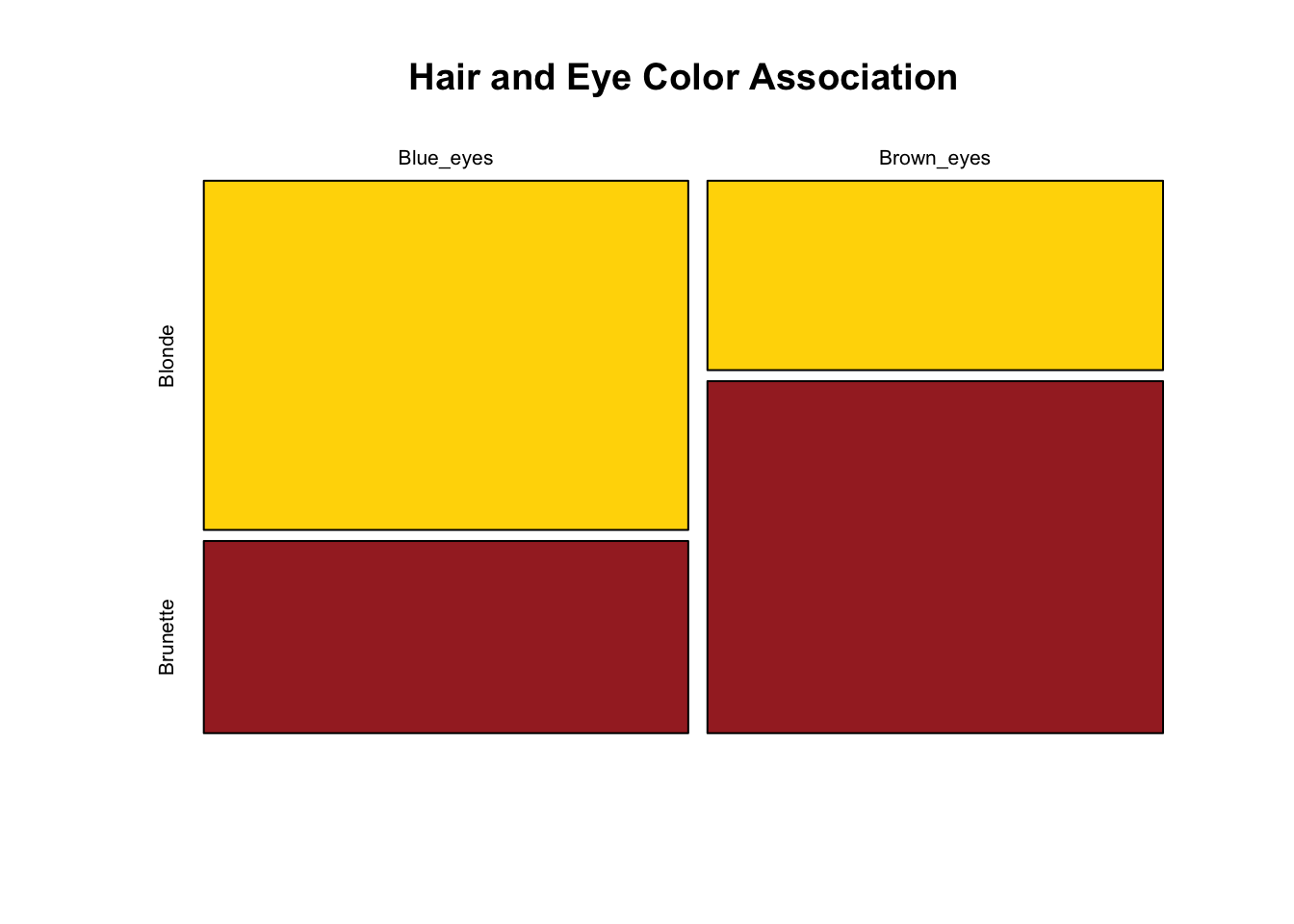
When we have two categorical variables, we use a contingency table to examine their association. The null hypothesis is that the variables are independent.
Code
# Example: Hair color and eye color association# Data from 1000 studentshair_eye <-matrix(c(347, 191, # Blue eyes: blonde, brunette177, 329), # Brown eyes: blonde, brunettenrow =2, byrow =TRUE)rownames(hair_eye) <-c("Blue_eyes", "Brown_eyes")colnames(hair_eye) <-c("Blonde", "Brunette")# View the contingency tablehair_eye
Residuals > 2 or < -2 indicate cells contributing substantially to the association. Positive residuals mean more observations than expected under independence; negative means fewer.
G-Test (Log-Likelihood Ratio Test)
The G-test is an alternative to chi-square based on likelihood ratios:
The G-test and chi-square give similar results for large samples, but G-tests are preferred when: - Sample sizes are small - Differences between observed and expected are small - You want to decompose complex tables
The chi-square test tells us whether variables are associated, but not the strength of association. For 2×2 tables, the odds ratio quantifies effect size.
The odds of an event are \(\frac{p}{1-p}\). The odds ratio compares odds between groups:
# Odds ratio for hair/eye color dataa <- hair_eye[1,1] # Blue eyes, Blondeb <- hair_eye[1,2] # Blue eyes, Brunettec <- hair_eye[2,1] # Brown eyes, Blonded <- hair_eye[2,2] # Brown eyes, Brunetteodds_ratio <- (a * d) / (b * c)cat("Odds Ratio:", round(odds_ratio, 2), "\n")
Odds Ratio: 3.38
An OR of 3.38 means blue-eyed individuals have about 3.4 times the odds of being blonde compared to brown-eyed individuals.
OR = 1: No association
OR > 1: Positive association
OR < 1: Negative association
Code
# Confidence interval for odds ratio (using log transform)log_OR <-log(odds_ratio)se_log_OR <-sqrt(1/a +1/b +1/c +1/d)ci_log <- log_OR +c(-1.96, 1.96) * se_log_ORci_OR <-exp(ci_log)cat("95% CI for OR: [", round(ci_OR[1], 2), ",", round(ci_OR[2], 2), "]\n")
95% CI for OR: [ 2.62 , 4.35 ]
Fisher’s Exact Test
For small sample sizes (expected counts < 5), Fisher’s exact test is more appropriate. It calculates exact probabilities rather than relying on the chi-square approximation.
Code
# Small sample examplesmall_table <-matrix(c(3, 1, 1, 3), nrow =2)fisher.test(small_table)
    Fisher's Exact Test for Count Data

data:  small_table
p-value = 0.4857
alternative hypothesis: true odds ratio is not equal to 1
95 percent confidence interval:
   0.2117329 621.9337505
sample estimates:
odds ratio
  6.408309
Fisher’s test is preferred for 2×2 tables with small samples and provides a confidence interval for the odds ratio.
29.3 Components of a GLM
GLMs have three components:
Random component: Specifies the probability distribution of the response variable (e.g., binomial, Poisson, normal).
Systematic component: The linear predictor, a linear combination of explanatory variables: \[\eta = \beta_0 + \beta_1 x_1 + \beta_2 x_2 + \ldots\]
Link function: Connects the random and systematic components, transforming the expected value of the response to the scale of the linear predictor.
29.4 The Link Function
Different distributions use different link functions:
Distribution
Typical Link
Link Function
Normal
Identity
\(\eta = \mu\)
Binomial
Logit
\(\eta = \log(\frac{\mu}{1-\mu})\)
Poisson
Log
\(\eta = \log(\mu)\)
29.5 Logistic Regression
Logistic regression models binary outcomes. The response is 0 or 1 (failure or success), and we model the probability of success as a function of predictors.
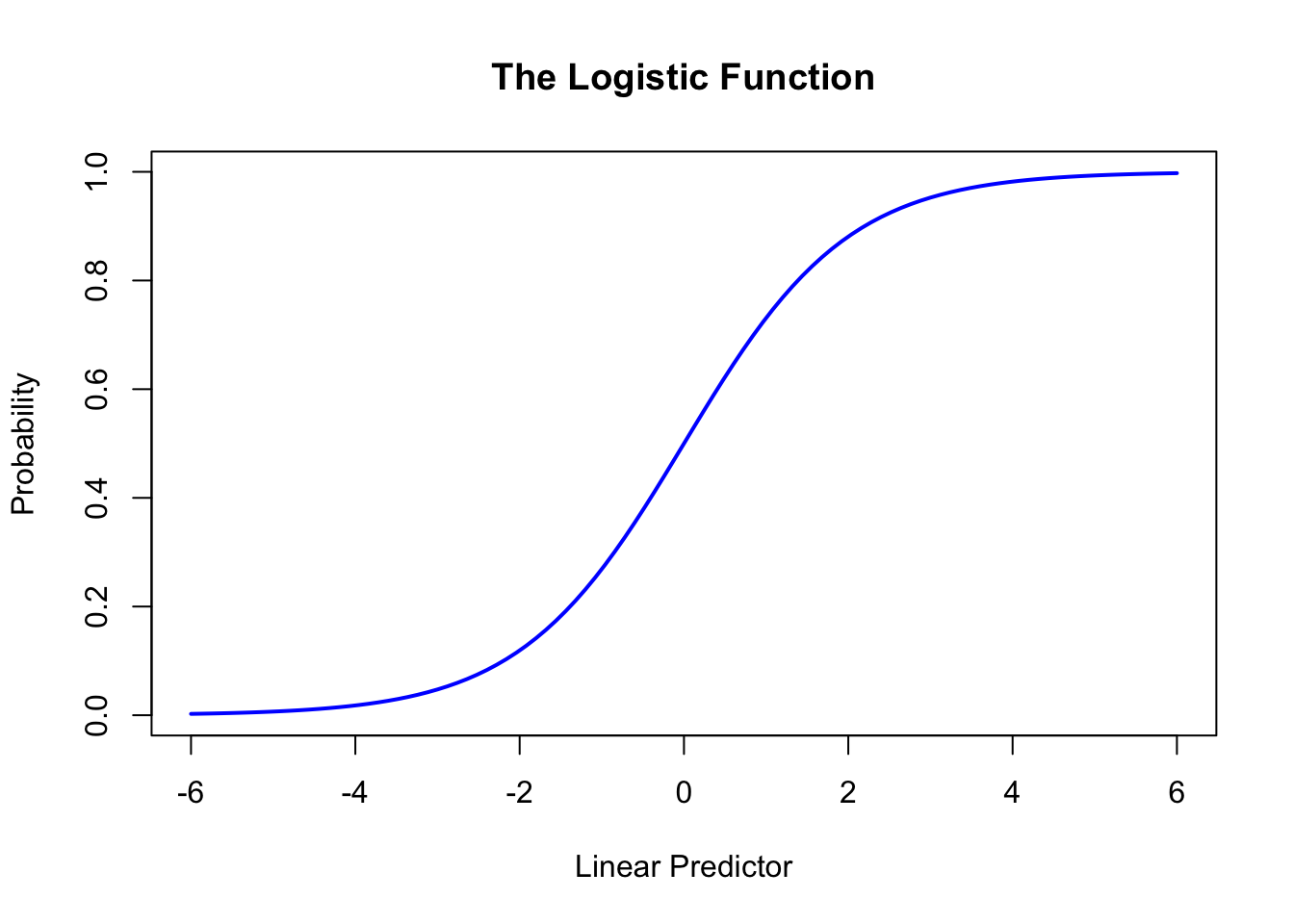
The logistic function maps the linear predictor to probabilities:
# The logistic functioncurve(1/ (1+exp(-x)), from =-6, to =6, xlab ="Linear Predictor", ylab ="Probability",main ="The Logistic Function", lwd =2, col ="blue")
Figure 29.2: The logistic function mapping the linear predictor to probabilities between 0 and 1
29.6 Fitting Logistic Regression
Code
# Example: predicting transmission type from mpgdata(mtcars)mtcars$am <-factor(mtcars$am, labels =c("automatic", "manual"))logit_model <-glm(am ~ mpg, data = mtcars, family = binomial)summary(logit_model)
Call:
glm(formula = am ~ mpg, family = binomial, data = mtcars)

Coefficients:
            Estimate Std. Error z value Pr(>|z|)
(Intercept)  -6.6035     2.3514  -2.808  0.00498 **
mpg           0.3070     0.1148   2.673  0.00751 **
---
Signif. codes:  0 '***' 0.001 '**' 0.01 '*' 0.05 '.' 0.1 ' ' 1

(Dispersion parameter for binomial family taken to be 1)

    Null deviance: 43.230  on 31  degrees of freedom
Residual deviance: 29.675  on 30  degrees of freedom
AIC: 33.675

Number of Fisher Scoring iterations: 5
29.7 Interpreting Logistic Coefficients
Coefficients are on the log-odds scale. To interpret them:
Exponentiate to get odds ratios:
Code
exp(coef(logit_model))
(Intercept)         mpg
0.001355579 1.359379288
The odds ratio for mpg (1.36) means that each additional mpg is associated with 36% higher odds of having a manual transmission.
29.8 Making Predictions
Code
# Predict probability for specific mpg valuesnew_data <-data.frame(mpg =c(15, 20, 25, 30))predict(logit_model, newdata = new_data, type ="response")
        1         2         3         4
0.1194021 0.3862832 0.7450109 0.9313311
The type = "response" argument returns probabilities rather than log-odds.
29.9 Multiple Logistic Regression
Like linear regression, logistic regression can include multiple predictors. This allows us to:
Control for confounding variables
Examine how multiple factors together predict the outcome
Test for interactions between predictors
Code
# Multiple logistic regression: am ~ mpg + wt + hpmulti_logit <-glm(am ~ mpg + wt + hp, data = mtcars, family = binomial)summary(multi_logit)
Call:
glm(formula = am ~ mpg + wt + hp, family = binomial, data = mtcars)

Coefficients:
             Estimate Std. Error z value Pr(>|z|)
(Intercept) -15.72137   40.00281  -0.393   0.6943
mpg           1.22930    1.58109   0.778   0.4369
wt           -6.95492    3.35297  -2.074   0.0381 *
hp            0.08389    0.08228   1.020   0.3079
---
Signif. codes:  0 '***' 0.001 '**' 0.01 '*' 0.05 '.' 0.1 ' ' 1

(Dispersion parameter for binomial family taken to be 1)

    Null deviance: 43.2297  on 31  degrees of freedom
Residual deviance:  8.7661  on 28  degrees of freedom
AIC: 16.766

Number of Fisher Scoring iterations: 10
Code
# Odds ratios for all predictorsexp(coef(multi_logit))
 (Intercept)          mpg           wt           hp
1.486947e-07 3.418843e+00 9.539266e-04 1.087513e+00
Notice how coefficients change compared to the simple model—this is the effect of controlling for other variables.
Code
# Compare models with likelihood ratio testanova(logit_model, multi_logit, test ="Chisq")
Analysis of Deviance Table

Model 1: am ~ mpg
Model 2: am ~ mpg + wt + hp
  Resid. Df Resid. Dev Df Deviance  Pr(>Chi)
1        30    29.6752
2        28     8.7661  2   20.909 2.882e-05 ***
---
Signif. codes:  0 '***' 0.001 '**' 0.01 '*' 0.05 '.' 0.1 ' ' 1
The likelihood ratio test compares nested models. A significant p-value indicates the fuller model fits significantly better.
29.10 Poisson Regression
Poisson regression models count data—the number of events in a fixed period or area. The response must be non-negative integers, and we assume events occur independently at a constant rate.
Call:
glm(formula = counts ~ exposure, family = poisson)

Coefficients:
            Estimate Std. Error z value Pr(>|z|)
(Intercept)  0.42499    0.10624    4.00 6.32e-05 ***
exposure     0.30714    0.01345   22.84  < 2e-16 ***
---
Signif. codes:  0 '***' 0.001 '**' 0.01 '*' 0.05 '.' 0.1 ' ' 1

(Dispersion parameter for poisson family taken to be 1)

    Null deviance: 744.110  on 99  degrees of freedom
Residual deviance:  97.826  on 98  degrees of freedom
AIC: 498.52

Number of Fisher Scoring iterations: 4
29.11 Overdispersion
A key assumption of Poisson regression is that the mean equals the variance. When variance exceeds the mean (overdispersion), standard errors are underestimated and p-values become too small.
Code
# Check for overdispersion# Ratio of residual deviance to df should be near 1dispersion_ratio <- pois_model$deviance / pois_model$df.residualcat("Dispersion ratio:", round(dispersion_ratio, 3), "\n")
Dispersion ratio: 0.998
Code
cat("Values > 1.5 suggest overdispersion\n")
Values > 1.5 suggest overdispersion
Handling Overdispersion
Quasi-Poisson estimates the dispersion parameter from the data rather than assuming it equals 1:
Code
# Create overdispersed data for demonstrationset.seed(42)n <-100x <-runif(n, 1, 10)# Generate overdispersed counts (negative binomial acts like overdispersed Poisson)y_overdispersed <-rnbinom(n, size =2, mu =exp(0.5+0.3* x))# Standard Poisson (ignores overdispersion)pois_fit <-glm(y_overdispersed ~ x, family = poisson)# Quasi-Poisson (accounts for overdispersion)quasi_fit <-glm(y_overdispersed ~ x, family = quasipoisson)# Compare standard errorscat("Poisson SE:", round(summary(pois_fit)$coefficients[2, 2], 4), "\n")
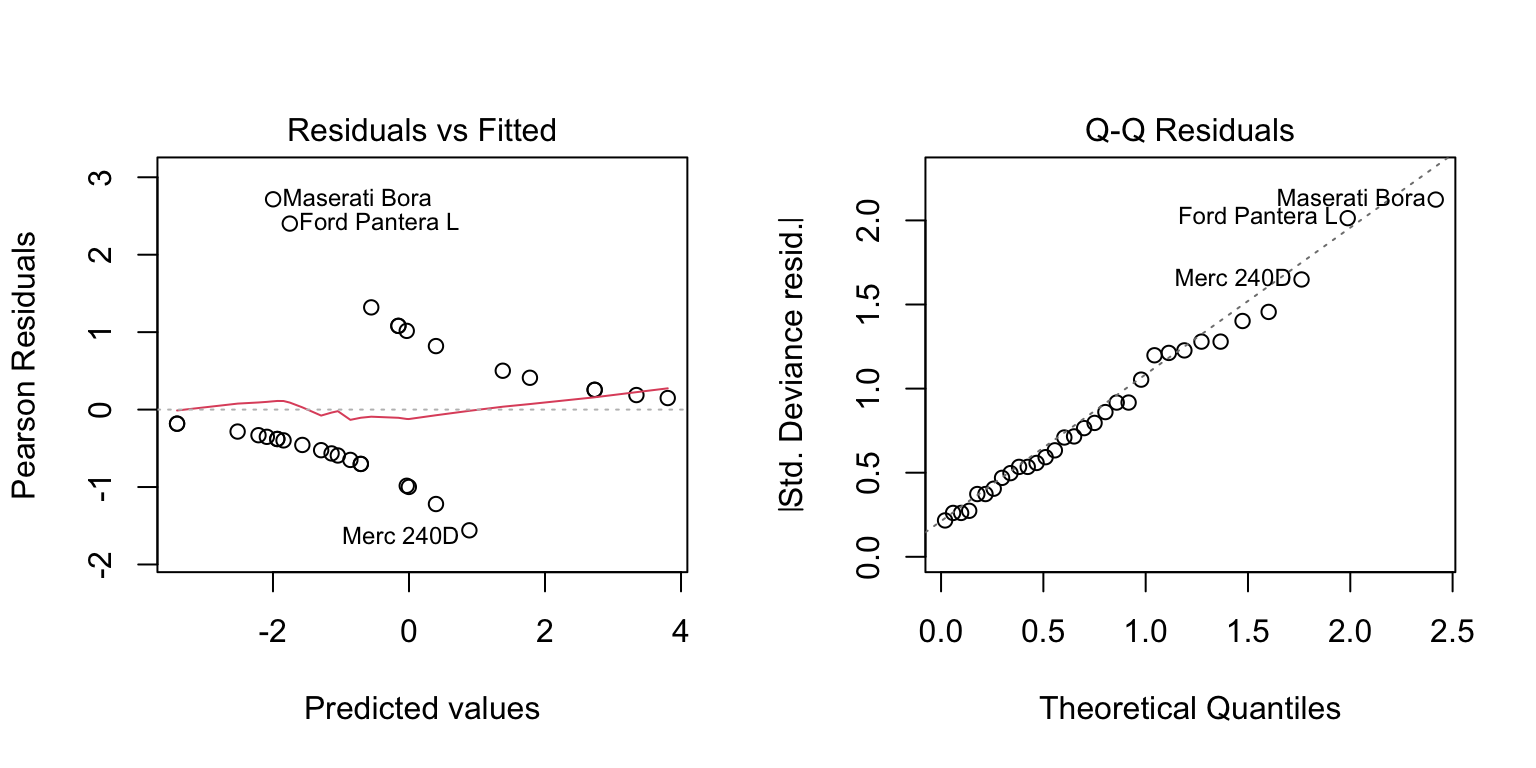
GLM assumptions include: - Correct specification of the distribution - Correct link function - Independence of observations - No extreme multicollinearity
par(mfrow =c(1, 2))plot(logit_model, which =c(1, 2))
Figure 29.3: Diagnostic plots for assessing logistic regression model assumptions
29.15 Summary
GLMs provide a flexible framework for modeling non-normal response variables while maintaining the interpretability of linear models. Logistic regression for binary outcomes and Poisson regression for counts are the most common applications, but the framework extends to other distributions as needed.
29.16 Exercises
Exercise G.1: Logistic Regression for Binary Outcomes
You study the effect of study time on exam success. Students either pass (1) or fail (0), and you record their study hours:
Calculate the expected number of colonies at concentration = 1.5
Check for overdispersion by comparing residual deviance to degrees of freedom
If overdispersed, refit using quasipoisson and compare standard errors
Create a plot showing observed counts and model predictions
Code
# Your code here
Exercise G.3: Model Comparison and Selection
Using the mtcars dataset, predict whether a car has an automatic transmission (am: 0 = automatic, 1 = manual) from various predictors:
Fit three logistic regression models:
Model 1: am ~ mpg
Model 2: am ~ mpg + wt
Model 3: am ~ mpg + wt + hp
Compare models using AIC
Perform likelihood ratio tests to compare nested models
Which model would you choose and why?
For your chosen model, interpret the coefficients in terms of odds ratios
Use the model to predict transmission type for a car with mpg=20, wt=3.0, hp=150
Code
# Your code here
Exercise G.4: Chi-Square and Contingency Tables
A genetics study crosses two heterozygous plants and observes offspring phenotypes. Expected ratio is 9:3:3:1.
observed <- c(293, 105, 98, 32) # Four phenotype categories
Perform a chi-square goodness-of-fit test
Calculate the expected counts and verify the chi-square assumption is met
Calculate the contribution of each category to the total chi-square statistic
Visualize observed vs. expected with a barplot
Do the data support the Mendelian hypothesis?
Now consider a 2×2 contingency table for treatment outcome by gender:
Success
Failure
Male
45
25
Female
60
20
Test for independence using chi-square
Calculate and interpret the odds ratio
Use Fisher’s exact test and compare to the chi-square result
Code
# Your code here
Exercise G.5: Handling Overdispersion
Simulate overdispersed count data and explore the consequences:
set.seed(123)
x <- seq(1, 10, length.out = 50)
# Negative binomial creates overdispersion
y <- rnbinom(50, size = 2, mu = exp(1 + 0.3 * x))
Fit both a Poisson and quasi-Poisson model
Calculate the dispersion parameter
Compare the standard errors between the two models
How does ignoring overdispersion affect inference?
Fit a negative binomial model using MASS::glm.nb() and compare to the quasi-Poisson approach
Which model would you prefer for these data and why?
Code
# Your code herelibrary(MASS) # for glm.nb()
Source Code
# Generalized Linear Models {#sec-glm}```{r}#| echo: false#| message: falselibrary(tidyverse)theme_set(theme_minimal())```## Beyond Normal DistributionsStandard linear regression assumes that the response variable is continuous and normally distributed. But many important response variables violate these assumptions. Binary outcomes (success/failure, alive/dead) follow binomial distributions. Count data (number of events, cells, species) often follow Poisson distributions.Generalized Linear Models (GLMs) extend linear regression to handle these situations. They provide a unified framework for modeling responses that follow different distributions from the exponential family.## Frequency Analysis: Categorical Response VariablesBefore diving into GLMs, it's important to understand how we analyze categorical response variables. When observations fall into categories rather than being measured on a continuous scale, we count the frequency in each category and compare observed frequencies to expected values.### Chi-Square Goodness of Fit TestThe **goodness of fit test** asks whether observed frequencies match a hypothesized distribution. The classic example comes from Mendelian genetics.```{r}# Mendel's pea experiment - F2 phenotype ratios# Expected: 9:3:3:1 for Yellow-Smooth:Yellow-Wrinkled:Green-Smooth:Green-Wrinkledobserved <-c(315, 101, 108, 32) # Mendel's actual dataexpected_ratios <-c(9/16, 3/16, 3/16, 1/16)# Perform chi-square testchisq.test(observed, p = expected_ratios)```The test statistic measures deviation from expected:$$\chi^2 = \sum \frac{(O_i - E_i)^2}{E_i}$$where $O_i$ are observed and $E_i$ are expected counts. Under the null hypothesis (observed frequencies match expected), this follows a chi-square distribution with $df = k - 1$ where $k$ is the number of categories.::: {.callout-warning}## Chi-Square Assumptions1. **Independence**: Observations must be independent2. **Expected counts**: No more than 20% of expected counts should be < 53. **Sample size**: Total sample should be reasonably largeCheck expected values before interpreting results:```{r}n <-sum(observed)expected <- n * expected_ratioscat("Expected counts:", round(expected, 1))```:::### Contingency Table AnalysisWhen we have two categorical variables, we use a **contingency table** to examine their association. The null hypothesis is that the variables are independent.```{r}# Example: Hair color and eye color association# Data from 1000 studentshair_eye <-matrix(c(347, 191, # Blue eyes: blonde, brunette177, 329), # Brown eyes: blonde, brunettenrow =2, byrow =TRUE)rownames(hair_eye) <-c("Blue_eyes", "Brown_eyes")colnames(hair_eye) <-c("Blonde", "Brunette")# View the contingency tablehair_eye# Chi-square test of independencechisq.test(hair_eye)```For contingency tables, $df = (r-1)(c-1)$ where $r$ and $c$ are the number of rows and columns.```{r}#| label: fig-mosaic-plot#| fig-cap: "Mosaic plot showing the association between hair color and eye color"#| fig-width: 7#| fig-height: 5# Visualize with a mosaic plotmosaicplot(hair_eye, main ="Hair and Eye Color Association",color =c("gold", "brown"), shade =FALSE)```### Standardized ResidualsTo understand where associations are strongest, examine **standardized residuals**:```{r}# Which cells deviate most from independence?test_result <-chisq.test(hair_eye)test_result$residuals```Residuals > 2 or < -2 indicate cells contributing substantially to the association. Positive residuals mean more observations than expected under independence; negative means fewer.### G-Test (Log-Likelihood Ratio Test)The **G-test** is an alternative to chi-square based on likelihood ratios:$$G = 2 \sum O_i \ln\left(\frac{O_i}{E_i}\right)$$The G-test and chi-square give similar results for large samples, but G-tests are preferred when:- Sample sizes are small- Differences between observed and expected are small- You want to decompose complex tables```{r}# Manual G-test calculationobserved_flat <-as.vector(hair_eye)expected_flat <-as.vector(test_result$expected)G <-2*sum(observed_flat *log(observed_flat / expected_flat))p_value <-1-pchisq(G, df =1)cat("G statistic:", round(G, 3), "\n")cat("p-value:", format(p_value, scientific =TRUE), "\n")```### Odds Ratios: Measuring Effect SizeThe chi-square test tells us *whether* variables are associated, but not the **strength** of association. For 2×2 tables, the **odds ratio** quantifies effect size.The odds of an event are $\frac{p}{1-p}$. The odds ratio compares odds between groups:$$OR = \frac{odds_1}{odds_2} = \frac{a/b}{c/d} = \frac{ad}{bc}$$```{r}# Odds ratio for hair/eye color dataa <- hair_eye[1,1] # Blue eyes, Blondeb <- hair_eye[1,2] # Blue eyes, Brunettec <- hair_eye[2,1] # Brown eyes, Blonded <- hair_eye[2,2] # Brown eyes, Brunetteodds_ratio <- (a * d) / (b * c)cat("Odds Ratio:", round(odds_ratio, 2), "\n")```An OR of `r round(odds_ratio, 2)` means blue-eyed individuals have about `r round(odds_ratio, 1)` times the odds of being blonde compared to brown-eyed individuals.- OR = 1: No association- OR > 1: Positive association- OR < 1: Negative association```{r}# Confidence interval for odds ratio (using log transform)log_OR <-log(odds_ratio)se_log_OR <-sqrt(1/a +1/b +1/c +1/d)ci_log <- log_OR +c(-1.96, 1.96) * se_log_ORci_OR <-exp(ci_log)cat("95% CI for OR: [", round(ci_OR[1], 2), ",", round(ci_OR[2], 2), "]\n")```### Fisher's Exact TestFor small sample sizes (expected counts < 5), **Fisher's exact test** is more appropriate. It calculates exact probabilities rather than relying on the chi-square approximation.```{r}# Small sample examplesmall_table <-matrix(c(3, 1, 1, 3), nrow =2)fisher.test(small_table)```Fisher's test is preferred for 2×2 tables with small samples and provides a confidence interval for the odds ratio.## Components of a GLMGLMs have three components:**Random component**: Specifies the probability distribution of the response variable (e.g., binomial, Poisson, normal).**Systematic component**: The linear predictor, a linear combination of explanatory variables:$$\eta = \beta_0 + \beta_1 x_1 + \beta_2 x_2 + \ldots$$**Link function**: Connects the random and systematic components, transforming the expected value of the response to the scale of the linear predictor.## The Link FunctionDifferent distributions use different link functions:| Distribution | Typical Link | Link Function ||:-------------|:-------------|:--------------|| Normal | Identity | $\eta = \mu$ || Binomial | Logit | $\eta = \log(\frac{\mu}{1-\mu})$ || Poisson | Log | $\eta = \log(\mu)$ |## Logistic RegressionLogistic regression models binary outcomes. The response is 0 or 1 (failure or success), and we model the probability of success as a function of predictors.The logistic function maps the linear predictor to probabilities:$$P(Y = 1 | X) = \frac{1}{1 + e^{-(\beta_0 + \beta_1 X)}}$$Equivalently, we model the log-odds:$$\log\left(\frac{P}{1-P}\right) = \beta_0 + \beta_1 X$$```{r}#| label: fig-logistic-function#| fig-cap: "The logistic function mapping the linear predictor to probabilities between 0 and 1"#| fig-width: 7#| fig-height: 5# The logistic functioncurve(1/ (1+exp(-x)), from =-6, to =6, xlab ="Linear Predictor", ylab ="Probability",main ="The Logistic Function", lwd =2, col ="blue")```## Fitting Logistic Regression```{r}# Example: predicting transmission type from mpgdata(mtcars)mtcars$am <-factor(mtcars$am, labels =c("automatic", "manual"))logit_model <-glm(am ~ mpg, data = mtcars, family = binomial)summary(logit_model)```## Interpreting Logistic CoefficientsCoefficients are on the log-odds scale. To interpret them:**Exponentiate** to get odds ratios:```{r}exp(coef(logit_model))```The odds ratio for mpg (1.36) means that each additional mpg is associated with 36% higher odds of having a manual transmission.## Making Predictions```{r}# Predict probability for specific mpg valuesnew_data <-data.frame(mpg =c(15, 20, 25, 30))predict(logit_model, newdata = new_data, type ="response")```The `type = "response"` argument returns probabilities rather than log-odds.## Multiple Logistic RegressionLike linear regression, logistic regression can include multiple predictors. This allows us to:- Control for confounding variables- Examine how multiple factors together predict the outcome- Test for interactions between predictors```{r}# Multiple logistic regression: am ~ mpg + wt + hpmulti_logit <-glm(am ~ mpg + wt + hp, data = mtcars, family = binomial)summary(multi_logit)``````{r}# Odds ratios for all predictorsexp(coef(multi_logit))```Notice how coefficients change compared to the simple model—this is the effect of controlling for other variables.```{r}# Compare models with likelihood ratio testanova(logit_model, multi_logit, test ="Chisq")```The likelihood ratio test compares nested models. A significant p-value indicates the fuller model fits significantly better.## Poisson RegressionPoisson regression models count data—the number of events in a fixed period or area. The response must be non-negative integers, and we assume events occur independently at a constant rate.$$\log(\mu) = \beta_0 + \beta_1 X$$```{r}# Example: modeling count dataset.seed(42)exposure <-runif(100, 1, 10)counts <-rpois(100, lambda =exp(0.5+0.3* exposure))pois_model <-glm(counts ~ exposure, family = poisson)summary(pois_model)```## OverdispersionA key assumption of Poisson regression is that the mean equals the variance. When variance exceeds the mean (**overdispersion**), standard errors are underestimated and p-values become too small.```{r}# Check for overdispersion# Ratio of residual deviance to df should be near 1dispersion_ratio <- pois_model$deviance / pois_model$df.residualcat("Dispersion ratio:", round(dispersion_ratio, 3), "\n")cat("Values > 1.5 suggest overdispersion\n")```### Handling Overdispersion**Quasi-Poisson** estimates the dispersion parameter from the data rather than assuming it equals 1:```{r}# Create overdispersed data for demonstrationset.seed(42)n <-100x <-runif(n, 1, 10)# Generate overdispersed counts (negative binomial acts like overdispersed Poisson)y_overdispersed <-rnbinom(n, size =2, mu =exp(0.5+0.3* x))# Standard Poisson (ignores overdispersion)pois_fit <-glm(y_overdispersed ~ x, family = poisson)# Quasi-Poisson (accounts for overdispersion)quasi_fit <-glm(y_overdispersed ~ x, family = quasipoisson)# Compare standard errorscat("Poisson SE:", round(summary(pois_fit)$coefficients[2, 2], 4), "\n")cat("Quasi-Poisson SE:", round(summary(quasi_fit)$coefficients[2, 2], 4), "\n")cat("SE inflation factor:", round(summary(quasi_fit)$coefficients[2, 2] /summary(pois_fit)$coefficients[2, 2], 2), "\n")```Similarly, **quasibinomial** handles overdispersion in binomial data:```{r}# Quasibinomial example# family = quasibinomial adjusts for extra-binomial variation```::: {.callout-tip}## When to Use Quasi-LikelihoodUse `quasipoisson` or `quasibinomial` when:- Dispersion ratio is substantially > 1 (overdispersion)- You don't need AIC for model comparison (quasi-models don't have AIC)- The basic model structure is correct but variance assumptions are violatedFor severe overdispersion, consider **negative binomial regression** (package `MASS`) which models overdispersion explicitly.:::## Model AssessmentGLMs use **deviance** rather than R² to assess fit. Deviance compares the fitted model to a saturated model (one parameter per observation).**Null deviance**: Deviance with only the intercept**Residual deviance**: Deviance of the fitted modelA large drop from null to residual deviance indicates the predictors explain substantial variation.```{r}# Compare devianceswith(logit_model, null.deviance - deviance)# Chi-square test for improvementwith(logit_model, pchisq(null.deviance - deviance, df.null - df.residual, lower.tail =FALSE))```## Model Comparison with AICAs with linear models, AIC helps compare GLMs:```{r}# Compare modelsmodel1 <-glm(am ~ mpg, data = mtcars, family = binomial)model2 <-glm(am ~ mpg + wt, data = mtcars, family = binomial)model3 <-glm(am ~ mpg * wt, data = mtcars, family = binomial)AIC(model1, model2, model3)```## Assumptions and DiagnosticsGLM assumptions include:- Correct specification of the distribution- Correct link function- Independence of observations- No extreme multicollinearityDiagnostic tools include:- Residual plots (deviance or Pearson residuals)- Influence measures- Goodness-of-fit tests```{r}#| label: fig-glm-diagnostics#| fig-cap: "Diagnostic plots for assessing logistic regression model assumptions"#| fig-width: 8#| fig-height: 4par(mfrow =c(1, 2))plot(logit_model, which =c(1, 2))```## SummaryGLMs provide a flexible framework for modeling non-normal response variables while maintaining the interpretability of linear models. Logistic regression for binary outcomes and Poisson regression for counts are the most common applications, but the framework extends to other distributions as needed.## Exercises::: {.callout-note}### Exercise G.1: Logistic Regression for Binary OutcomesYou study the effect of study time on exam success. Students either pass (1) or fail (0), and you record their study hours:```study_hours <- c(1, 2, 3, 4, 5, 6, 7, 8, 9, 10, 11, 12)pass <- c(0, 0, 0, 1, 0, 1, 1, 1, 1, 1, 1, 1)```a) Fit a logistic regression model predicting pass/fail from study hoursb) Interpret the coefficient for study hours on the log-odds scalec) Calculate and interpret the odds ratio for a one-hour increase in study timed) Predict the probability of passing for a student who studies 5 hourse) At what study time does the model predict a 50% probability of passing?f) Create a visualization showing the fitted logistic curve with the observed data points```{r}#| eval: false# Your code here```:::::: {.callout-note}### Exercise G.2: Poisson Regression for Count DataYou count the number of bacterial colonies on petri dishes as a function of antibiotic concentration:```concentration <- c(0, 0.5, 1.0, 1.5, 2.0, 2.5, 3.0)colonies <- c(142, 118, 89, 67, 45, 32, 21)```a) Fit a Poisson regression modelb) Interpret the coefficient for concentrationc) Calculate the expected number of colonies at concentration = 1.5d) Check for overdispersion by comparing residual deviance to degrees of freedome) If overdispersed, refit using quasipoisson and compare standard errorsf) Create a plot showing observed counts and model predictions```{r}#| eval: false# Your code here```:::::: {.callout-note}### Exercise G.3: Model Comparison and SelectionUsing the `mtcars` dataset, predict whether a car has an automatic transmission (`am`: 0 = automatic, 1 = manual) from various predictors:a) Fit three logistic regression models: - Model 1: `am ~ mpg` - Model 2: `am ~ mpg + wt` - Model 3: `am ~ mpg + wt + hp`b) Compare models using AICc) Perform likelihood ratio tests to compare nested modelsd) Which model would you choose and why?e) For your chosen model, interpret the coefficients in terms of odds ratiosf) Use the model to predict transmission type for a car with mpg=20, wt=3.0, hp=150```{r}#| eval: false# Your code here```:::::: {.callout-note}### Exercise G.4: Chi-Square and Contingency TablesA genetics study crosses two heterozygous plants and observes offspring phenotypes. Expected ratio is 9:3:3:1.```observed <- c(293, 105, 98, 32) # Four phenotype categories```a) Perform a chi-square goodness-of-fit testb) Calculate the expected counts and verify the chi-square assumption is metc) Calculate the contribution of each category to the total chi-square statisticd) Visualize observed vs. expected with a barplote) Do the data support the Mendelian hypothesis?Now consider a 2×2 contingency table for treatment outcome by gender:|| Success | Failure ||:--|:--------|:--------|| Male | 45 | 25 || Female | 60 | 20 |f) Test for independence using chi-squareg) Calculate and interpret the odds ratioh) Use Fisher's exact test and compare to the chi-square result```{r}#| eval: false# Your code here```:::::: {.callout-note}### Exercise G.5: Handling OverdispersionSimulate overdispersed count data and explore the consequences:```set.seed(123)x <- seq(1, 10, length.out = 50)# Negative binomial creates overdispersiony <- rnbinom(50, size = 2, mu = exp(1 + 0.3 * x))```a) Fit both a Poisson and quasi-Poisson modelb) Calculate the dispersion parameterc) Compare the standard errors between the two modelsd) How does ignoring overdispersion affect inference?e) Fit a negative binomial model using `MASS::glm.nb()` and compare to the quasi-Poisson approachf) Which model would you prefer for these data and why?```{r}#| eval: false# Your code herelibrary(MASS) # for glm.nb()```:::